This page answers the questions an IT or security reviewer usually asks before signing off on OrgNice. For a broader overview of what OrgNice does, see What is OrgNice?
What data OrgNice accesses
OrgNice connects to your Google Sheet using Google OAuth 2.0, requesting read-only access scoped to the specific Sheet you connect to a project. OrgNice cannot write to your Sheet, cannot browse other files in your Drive, and cannot access any other Google service. OrgNice has completed Google’s OAuth application verification process.
You can revoke this access at any time, from within OrgNice (see Managing Google Sheets Data Access) or directly from your Google Account settings. Revocation takes effect immediately: OrgNice can no longer read the Sheet, and viewers see an error message until access is restored.
How data flows
Your Google Sheet → OrgNice (reads live, on every view) → Shared view (Directory / Org Chart)
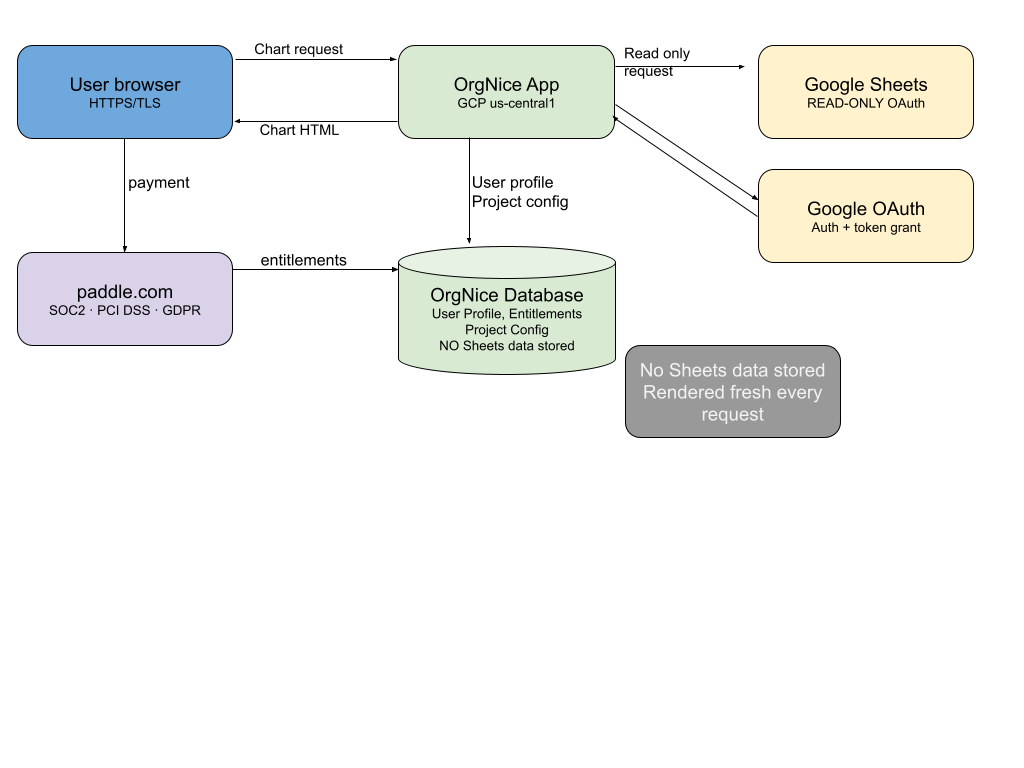
When someone opens a chart or directory, OrgNice reads the current state of your Sheet in real time and renders that view for that request. There is no import step and no sync job: every view is generated fresh.
OrgNice does not store your Sheet’s contents (employee names, titles, reporting lines, or any other row data) in its database. That data exists only in memory while a page is being rendered, and is sent to the browser encrypted over TLS. What OrgNice does store:
- Your account info: email, name, locale, and (if applicable) your Google Workspace domain (e.g.
nyu.edu), used for identification and access control - Project configuration: the Sheet URL, your column mappings, and appearance settings. None of this contains your Sheet’s actual data.
- Location lookups, if you use Map View: the one place where text from your Sheet is kept. See Map View and location data below.
Profile images you’ve mapped from your Sheet are cached temporarily on disk to keep chart rendering fast. These are images you explicitly provided; OrgNice doesn’t collect or process images independently.
Infrastructure: OrgNice runs on Google Cloud Platform in us-central1 (United States); all application infrastructure stays in this region. Account and project configuration data live in an OrgNice database on that infrastructure, backed up regularly with copies retained in Google Cloud Storage.
Map View and location data
Map View is optional and only involves the column or columns you choose as locations. If you don’t use it, nothing in this section applies. If you do:
- Place text is sent to a geocoding service. To put a pin on the map, OrgNice looks up each distinct place text in your location column, for example
Nairobi, Kenya, or a full street address if that is what your column holds. If a map view has Add to each value set (see Map View), that text is combined with each row’s value and sent as one query. Today the geocoding service is Nominatim, the public geocoding service for OpenStreetMap data. Only the place text, and any configured “Add to each value” text, is sent; no names, emails, IDs or other columns go with it. Coordinates and Google Maps links that contain coordinates are read directly and need no lookup. - Short Google Maps links are opened once. A shortened
maps.app.goo.gllink is requested from Google to find where it points. OrgNice only follows links on Google Maps addresses. - Results are stored. The place text and what was found (coordinates and a display name) are kept in a cache in the OrgNice database, so the same place isn’t looked up twice. The cache is shared across all OrgNice projects and is keyed by the place text alone. It holds no names, emails, row IDs or project references, so an entry can’t be tied back to a person or to your organization. It does mean that place text from your Sheet is retained.
- Map tiles come from a third party. The map background is loaded by each viewer’s browser directly from CARTO’s tile servers, using OpenStreetMap data. As with any web map, CARTO can see the viewer’s IP address and the part of the world they’re looking at.
- Pins show where people are. Anyone who can view the Directory can see its map. If your location column holds home addresses, those are shown as pins. Use a city or office location if that isn’t what you want.
Access model
Today, each OrgNice project has one editor: the project owner, the person who connected the Sheet and configured the chart. Everyone else you share the project with gets view-only access, whether that’s specific people, your whole organization, or the public link, depending on what you choose. Multiple owners or editors per project may be added in the future, but that’s not available yet. See Sharing for how view access works in practice.
What OrgNice does not do
- No write access to your Google Sheet. The OAuth scope is read-only, full stop.
- No SSO/SAML support today. Sign-in is via Google OAuth only.
- No WCAG accessibility audit has been performed. We haven’t made accessibility claims we haven’t verified.
Payments
Payments are handled entirely by Paddle, acting as Merchant of Record. Paddle is SOC 2, PCI DSS, and GDPR compliant; see trust.paddle.com for their documentation. OrgNice never sees or stores your payment method details; Paddle simply tells OrgNice which plan and entitlements are active on your account.
Security questionnaires and data requests
For a security questionnaire, DPA, or any other data request, email support@org-nice.com.