Most growing organisations reach the same point. Someone sets up a Google Sheet as their employee roster — names, roles, locations, contact details — and it quietly becomes the de facto employee directory. It gets maintained. It has the right information. And it fundamentally doesn’t work as a directory.
The problem isn’t that the data doesn’t exist. The problem is that it’s locked in a format that only works for the person who built it.
Staff can’t search it. Most people don’t know it exists. Those who do have to download it or scroll through rows to find anyone. When someone new joins and asks “who handles finance in Poland?”, they ask you — because you’re the one who knows where the Sheet is.
It’s not just the day-to-day requests either. Leadership wants to understand the structure across regions. Someone’s putting together a presentation and needs an up-to-date org chart — and there isn’t one. A new team member is trying to figure out who to contact in a different department and has no way to find out without interrupting someone.
OrgNice turns a Google Sheet into a staff directory and org chart — no import step, no company email required.
Want to build a staff directory yourself? Get your Google Sheets Employee/Staff Directory template here → It includes a working reporting hierarchy, Type/Status dropdowns, and an instructions tab — free to copy and use.
What Is a Staff Directory?
A staff or employee directory is a searchable record of your people — not just names and titles, but the information colleagues actually need to work together: contact details, location, department, working pattern, and who they report to.
A useful employee directory does a few things well. It makes every person findable — by name, by department, by location, by any field that matters to your organisation. It gives each person a profile: a single place with their photo, contact details, and the context needed to reach out. It reflects structure as well as individuals — who reports to whom, how teams are organised across the org. And it works for your whole workforce: permanent staff, contractors, volunteers, and anyone else who’s part of how the organisation functions — regardless of whether they have a company email.
Most importantly, a directory nobody keeps up to date is worse than no directory. The data needs to come from wherever it already lives, updated automatically, so the profile you’re looking at reflects the person as they exist today — not as they were when someone last remembered to edit the entry.
The Options, And Why They Don’t Quite Fit
If you’ve looked into solving this, you’ve encountered a few approaches.
Build a proper intranet. SharePoint, Notion, a custom solution. If your organisation already has one, it probably has an employee directory section — and that directory is likely out of date. Because here’s the problem: someone has to keep the intranet directory in sync with the actual employee roster. Every time someone leaves, joins, or changes roles, two things need to be updated: the Google Sheet you already maintain, and the intranet. That almost never happens consistently. The directory loses credibility, people stop using it, and you’re back to being the one everyone asks.
Use your Google Workspace directory. Works well — if everyone has a company email. But plenty of real organisations have people who don’t: contractors, volunteers, committee members, country-level staff on local contracts, parents and board members and trustees at schools. They’re part of how the organisation functions. They won’t appear in Google’s built-in directory. And when someone needs to reach them, they ask you.
AppSheet or Softr. These tools let you build a fully custom app on top of Google Sheets. If you have complex requirements and the resources to match, they’re capable. But for a staff directory, it’s the equivalent of hiring an architect to put up a shelf. You’re not just building the directory — you’re taking on an app. It needs to be designed, configured, maintained, and updated every time your Sheet structure changes. The learning curve, ongoing overhead, and cost are all disproportionate to the problem.
Awesome Table. Displays Sheet data as a gallery or card view. Closer to the right idea, but it’s a display tool rather than a directory — no individual employee profile, no org structure, no sense of reporting relationships.
Organimi. A mature, capable product — better than the feature list implies, with strong sharing options and a thoughtful set of views. Getting there requires real setup investment though: a fixed schema your Sheet needs to conform to, a specific image naming convention for profile photos. And there’s an ongoing tradeoff worth thinking through: the Google Sheets sync runs every four hours. If someone updated the Sheet an hour ago, the directory you’re looking at — or exporting for a board meeting — may or may not reflect it. You can’t tell without checking the Sheet yourself, which starts to undermine the point. If you want an established, proven product and can accept that tradeoff, Organimi is a solid choice. If you need the directory to be trustworthy at any given moment, only a live connection solves that.
The gap none of these fill: a tool that takes your existing Google Sheet, presents it as a proper staff directory with individual employee profiles, handles people who don’t have a company email, and doesn’t require building or maintaining anything.
Why Keeping Google Sheets as the Backend Is the Right Call
The instinct to “move off spreadsheets” often underestimates the cost of what you’d be moving to — and overestimates the problem with the Sheet itself.
Your Sheet isn’t a temporary workaround. It’s a working system. People trust it. The data is already there. Moving to a dedicated system means migrating the data, training people on a new tool, and — critically — maintaining two sources of truth until everyone fully transitions. For an organisation of 100 to 500 people, that’s a meaningful investment that rarely pays off the way you’d hope.
What you need isn’t a new database. You need a way to present the one you already have, kept automatically in sync.
What OrgNice Does
OrgNice connects to your Google Sheet via Google OAuth and generates two things from it: a staff directory, so people can find individuals and reach them directly, and an org chart, so people can understand the structure. The Sheet stays the source of truth. When a row is updated, the directory updates. No import step, no sync job, no maintenance.
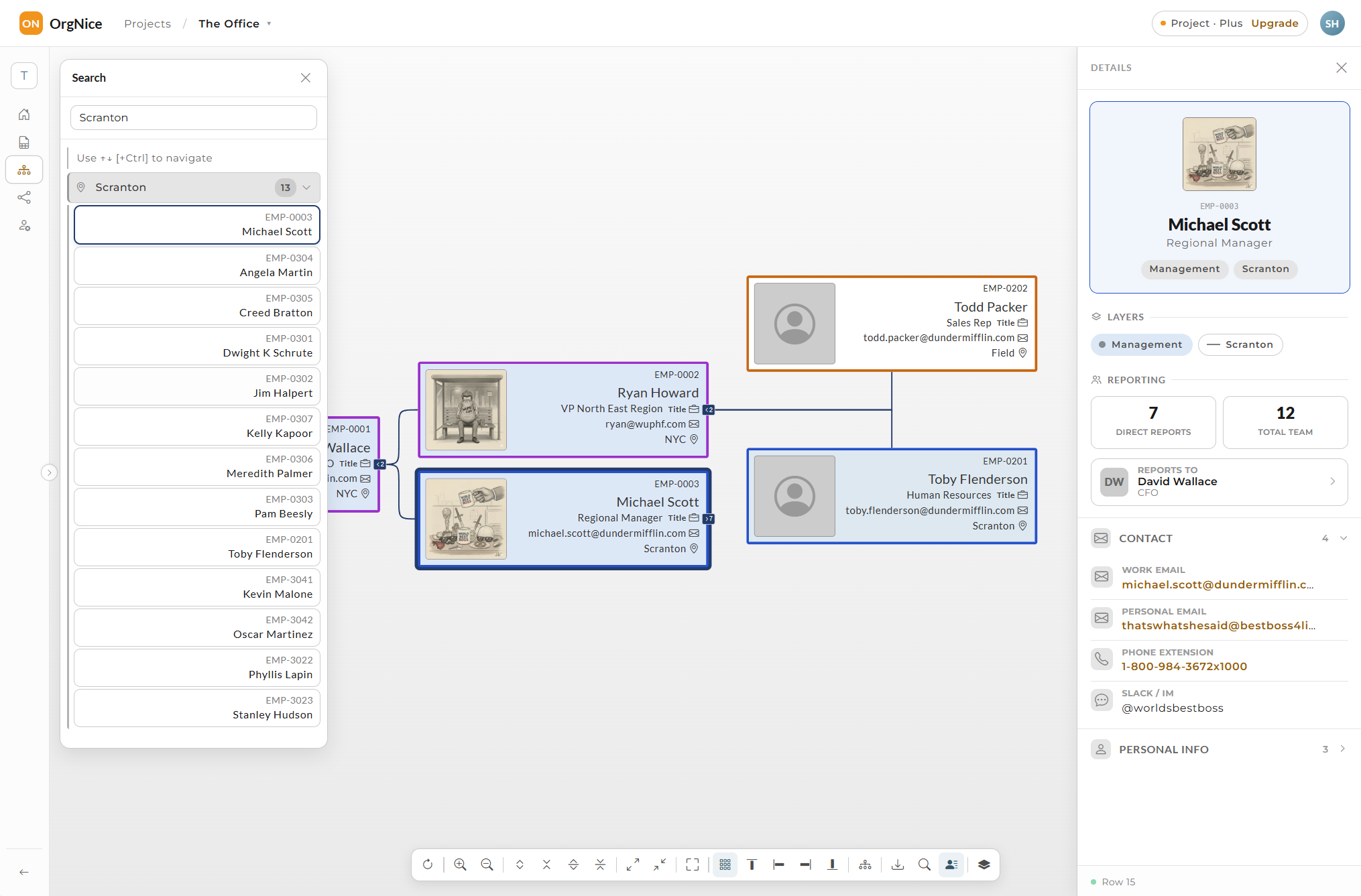
The employee profile. Click on anyone in OrgNice — in the directory or the org chart — and you get a rich profile: photo, contact details, location, department, working pattern, and reporting relationships.
Want to see it in action? Try the live demo →
All of it comes from your Sheet. Connect it once, and OrgNice analyses your columns and sets up the employee profile automatically — typically in under a minute. Add columns for “working days”, “Slack handle”, or anything else relevant to your team, and those surface in the profile too. The profile is the Sheet, presented usefully.
Embedding. The staff directory and org chart can be embedded anywhere that accepts an iframe — your existing intranet, a Google Site, Confluence, SharePoint, a team wiki. If you already have an intranet, you get a live, always-current employee directory inside it without rebuilding anything. If you don’t, a Google Sites page with an embedded OrgNice directory is up in an afternoon. And because it’s live-synced to your Sheet, anything embedded updates automatically — including presentations and pages that link to it.
Access control. Share publicly, via a password-protected link, or restricted to specific people. Nobody needs an OrgNice account to view the directory — just the link.
Who Needs This
The organisations where this problem is most acute tend to share a few characteristics.
Distributed teams with wide geographic spread. International NGOs, global services firms, remote-first companies — the wider the spread, the more opaque the organisation becomes. When your team spans multiple countries and most people have never met in person, a shared sense of who’s who doesn’t happen naturally. People in one country don’t know who to contact in another. Leadership can’t get a clear picture of the structure across regions. A staff directory built from the Sheet you already maintain solves this without creating new overhead.
Teams where people don’t regularly cross paths. Not every distributed team is remote-first — some are office-based but siloed across departments, sites, or shifts. If people’s working lives only intersect with their immediate colleagues, an accessible employee directory becomes the connective tissue that makes the wider organisation navigable.
Organisations with an extended workforce. Volunteers, contractors, committee members, board members and trustees, part-time and seasonal staff — these people are part of how the organisation functions, but they often don’t have a company email and they’re invisible to standard directory tools. OrgNice includes anyone in the Sheet, regardless of domain. A school administrator managing core staff, parent volunteers, and board members and trustees in one employee directory — without needing to provision accounts for any of them — is an exact fit.
Project-based and event-driven organisations. Production companies, event management firms, consulting teams — organisations where the roster changes frequently as project groups form and dissolve. A staff directory that’s live-synced from a Sheet handles roster changes better than any system that requires manual data entry.
What these organisations are typically looking for: something that works quickly without a steep learning curve; something that doesn’t ask them to change how they manage data; a significantly lower investment than an HRIS; a way to include the extended team regardless of whether they have a company email; and the ability to add or update employee details without touching anything other than the Sheet they already maintain.
Once your sheet is in good shape, structured, current, a working reporting hierarchy, the next question is how to scale it with your team. We’ve written about exactly that → And if you’re weighing OrgNice against the other tools out there, we compared them head to head, including what each one really costs.
If you’re maintaining a staff roster in Google Sheets and people still have to ask you to find anyone — or leadership is asking you for an org chart and you’re screenshotting a spreadsheet — OrgNice is worth trying. Free to start, and straightforward enough to have something working the same day.
Want to build a staff directory yourself? Get your Google Sheets Employee/Staff Directory template here →